
Introduction
I gave Hermes Agent a home on a 2012 Mac mini.
Not because running Hermes Agent was the goal in itself.
This Mac mini has been running almost continuously at home. It runs Linux Mint and Docker, but it obviously does not have the compute to run a modern LLM and put it to work.
On the other hand, I have a ThinkPad P14s Gen 7 AMD with 64 GB of RAM. It runs Qwen3.6 35B MoE on the Ryzen AI 9 HX PRO 470’s XDNA2 NPU through Lemonade and FastFlowLM.
That led to a question:
Does the machine that keeps an agent alive really have to be the same machine that runs LLM inference?
I decided to keep Hermes Agent running on the Mac mini and let it use the P14s NPU only when it needed to think.
Test environment
| Role | Configuration |
|---|---|
| Agent Runtime | Mac mini (2012) / Linux Mint / Docker / nousresearch/hermes-agent:latest |
| Inference Node | ThinkPad P14s Gen 7 AMD / 64 GB RAM / Ryzen AI 9 HX PRO 470 / XDNA2 NPU |
| Inference Stack | Lemonade 127.0.0.1:13305 → FastFlowLM 127.0.0.1:8001 → qwen3.6-moe-35b-a3b-FLM |
| Network | Tailscale / Tailscale Serve |
| Tested | September 22, 2026 |
I used the latest image tag for Hermes Agent during this experiment. Dashboard and web-backend behavior can change, so anyone reproducing this setup should pin an image tag or digest.
Separating the Agent Runtime from the Inference Node
This was the final topology.

The Mac mini is the Agent Runtime.
It stays online around the clock, accepts requests from Telegram and the Dashboard, and manages sessions, memory, skills, tools, and scheduled jobs.
It does not run LLM inference.
The P14s is the Inference Node.
It exposes Lemonade’s OpenAI-compatible API to the Mac mini over Tailscale and runs Qwen3.6 whenever Hermes sends a request.
Once the responsibilities were separated, the setup worked with surprisingly little drama.
Exposing a localhost-only LLM through Tailscale
Lemonade runs on 127.0.0.1:13305 on the P14s.
FastFlowLM also stays on 127.0.0.1:8001.
There is no need to make either service listen across the LAN.
Instead, I used Tailscale Serve.
tailscale serve --bg --tcp=13305 tcp://localhost:13305The path looks like this.

The inference server itself never listens beyond localhost.
Tailscale exposes only the required entry point to the tailnet.
From the Mac mini, I fetched /v1/models, then called /v1/chat/completions and received pong.
The inference path was open.
Letting Hermes use Qwen3.6
I installed Hermes Agent on the Mac mini with Docker.
The Custom Endpoint pointed to Lemonade on the P14s. The essential values were:
Base URL: http://<P14s MagicDNS name>:13305/v1
Model:    qwen3.6-moe-35b-a3b-FLM
When I asked the Hermes CLI to inspect its environment, Qwen3.6 generated a tool call.
Hermes executed the terminal tool inside the container on the Mac mini.
The result went back to the P14s.
Qwen3.6 read the result and produced the final answer.
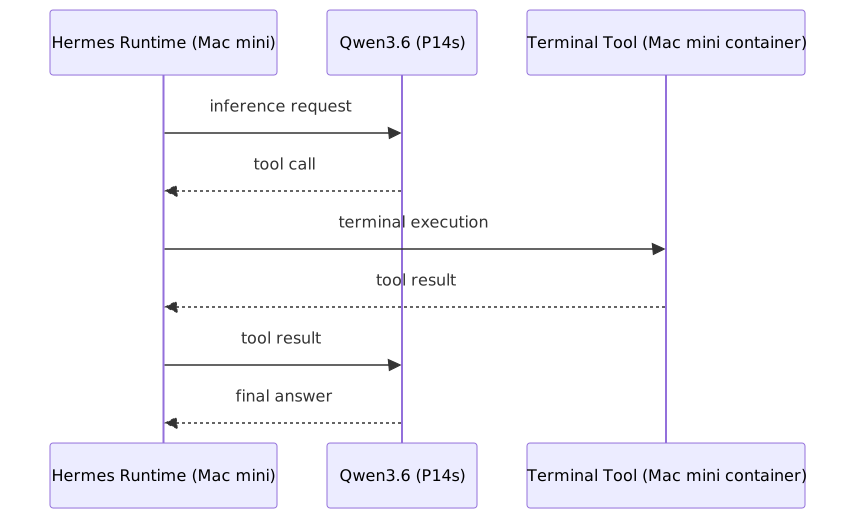
That was the point where the experiment became more interesting.
It was not merely that “a local LLM worked.”
A local LLM running on another machine had used tools owned by an agent that lived on the Mac mini to complete a task.
The Agent Runtime and the Inference Node really did not need to be the same machine.
Talking to it through Telegram
Next, I started the Hermes Gateway and connected a Telegram bot.
I separated tool permissions by interface.
The CLI can use Terminal, File Operations, Code Execution, and other powerful tools.
Telegram does not get those permissions. Its toolset centers on conversation, Web Search, Vision, Memory, and Planning.
An entry point that is easy to reach from a phone does not also need arbitrary command-execution privileges.
I sent a message from Telegram.

A reply came back.
At that point, it felt less like a local-LLM experiment and more like an agent had moved into the house.
The Dashboard fought back
Hermes also includes a Web Dashboard.
My first idea was simple.
Bind the service to 0.0.0.0:9119 inside the container, but publish it only to 127.0.0.1:9119 on the Mac mini.
Hermes refused to start.
A non-loopback bind requires Dashboard authentication, and Hermes fails closed when no authentication provider exists.
I switched the Dashboard container to host networking and bound Hermes itself to 127.0.0.1:9119.
The Dashboard worked from localhost.
The next step seemed obvious: expose it to the tailnet with Tailscale Serve.

This time I got:
Invalid Host header
Staying inside Hermes’s security boundary
At this point, I read the Hermes source.
The Dashboard accepts not only the bound host, but also the hostname configured in dashboard.public_url. I set that value to the HTTPS URL provided by Tailscale Serve.
dashboard:
  public_url: "https://<Mac mini tailnet FQDN>"
However, declaring an external public_url also enables the Dashboard authentication gate.
There is no configuration that conveniently bypasses authentication while allowing only the Host validation to pass.
So I stopped trying to work around it.
I used the Basic Auth provider built into Hermes.
After entering a username and password through the interactive setup, the password was stored as a scrypt hash rather than plaintext.
Hermes also generated a secret for signing sessions.
The final path became:

The Dashboard is not exposed directly to the LAN.
I am not using Tailscale Funnel.
I did not disable Hermes’s Host validation or authentication gate.
It took a detour, but finally seeing the Dashboard through that path felt satisfying.
Search does not necessarily mean reading
Next, I tried Web Search and Extract.
Hermes could search for news through DuckDuckGo.
But it failed when I asked it to retrieve the full text from a result URL.
The reason was straightforward: ddgs is a Search backend, not an Extract backend.
I split the configuration.
web:
  backend: ddgs
  extract_backend: firecrawl
I tried again.
Hermes extracted “Example Domain” from https://example.com.
It also extracted content from actual news pages.
After changing web.extract_backend to firecrawl, web_extract succeeded even though I had not explicitly configured a Firecrawl API key. Current Hermes versions provide keyless paths, so the behavior itself is not surprising. I did not identify from the logs which route this particular execution used.
That completed the following loop:

The agent had moved one step beyond talking about news from search-result snippets alone.
35B is, well, slow
There are tradeoffs, of course.
Qwen3.6 35B MoE is capable, but it is plainly slow in an agent loop.
It can spend more than 20 seconds thinking, and tasks with multiple tool calls can take minutes.
But raw tokens per second are not the only useful comparison here.
When I replace it with a smaller model, perhaps in the 9B class, I want to compare:
| Metric | What I want to know |
|---|---|
| Task Completion | Can it finish the task? |
| Tool Call Failure | Does it fail while generating, executing, or interpreting tool calls? |
| Loop Count | How many agent-loop turns does completion require? |
| Wall-clock | Does it finish within a tolerable amount of real time? |
| Evidence Discipline | Does it read pages, prefer primary sources, and handle contradictions instead of asserting from snippets alone? |
The goal is not necessarily to use the smartest available model. It is to use a model that can finish the resident agent’s work at the required quality.
And when the inference model changes, Hermes still retains its memory, skills, tools, cron jobs, and sessions.
That is another benefit of separating runtime from inference.
So what should this thing do?
With the environment working end to end, I wanted to give it an actual job.
A personalized morning technology-news briefing seemed like a good start.
Instead of producing a generic news ranking, it could select stories that intersect with the technologies I am currently using.
If there is nothing worth reporting, it does not need to pad the list.
The criteria for deciding what matters to me can live in a Skill.
At a scheduled time, Cron can start the job and use that Skill.
That is where keeping Hermes online around the clock begins to matter.
Where does the agent actually live?
The most interesting part of this experiment was not Hermes Agent itself.
Separating Agent Runtime from Inference made the agent’s boundary look different.
Qwen3.6 is replaceable.
Tomorrow it might be a 9B model, or a completely different model.
Meanwhile, the Runtime keeps:
- Memory
- Skills
- Rules
- Tools
- Sessions
- Cron
- Connections to external services
A weaker model may not execute the same Skill at the same quality. Inference capability still matters.
Even so, the agent’s working methods and continuity do not all need to be packed into model weights.
What counts as evidence?
In what order should the agent investigate something?
What must it never do?
Those working methods can remain outside the model.
The model becomes the reasoning engine used to carry out the work.
Hermes made that structure tangible in an always-on agent.
I did not set out to write an introduction to Hermes Agent.
I connected an old always-on machine, the NPU already sitting in my laptop, and Tailscale. Somewhere along the way, I ended up with a resident agent of my own.
The interesting part probably starts here.
cover image: unsplash